The full app, free, on your own keys
Live transcript of both sides, answers from your files and notes after the call. Add two free keys and press ▶: setup takes about 3 minutes.
No card · Mac app · macOS 14.4 or later, Apple Silicon and Intel
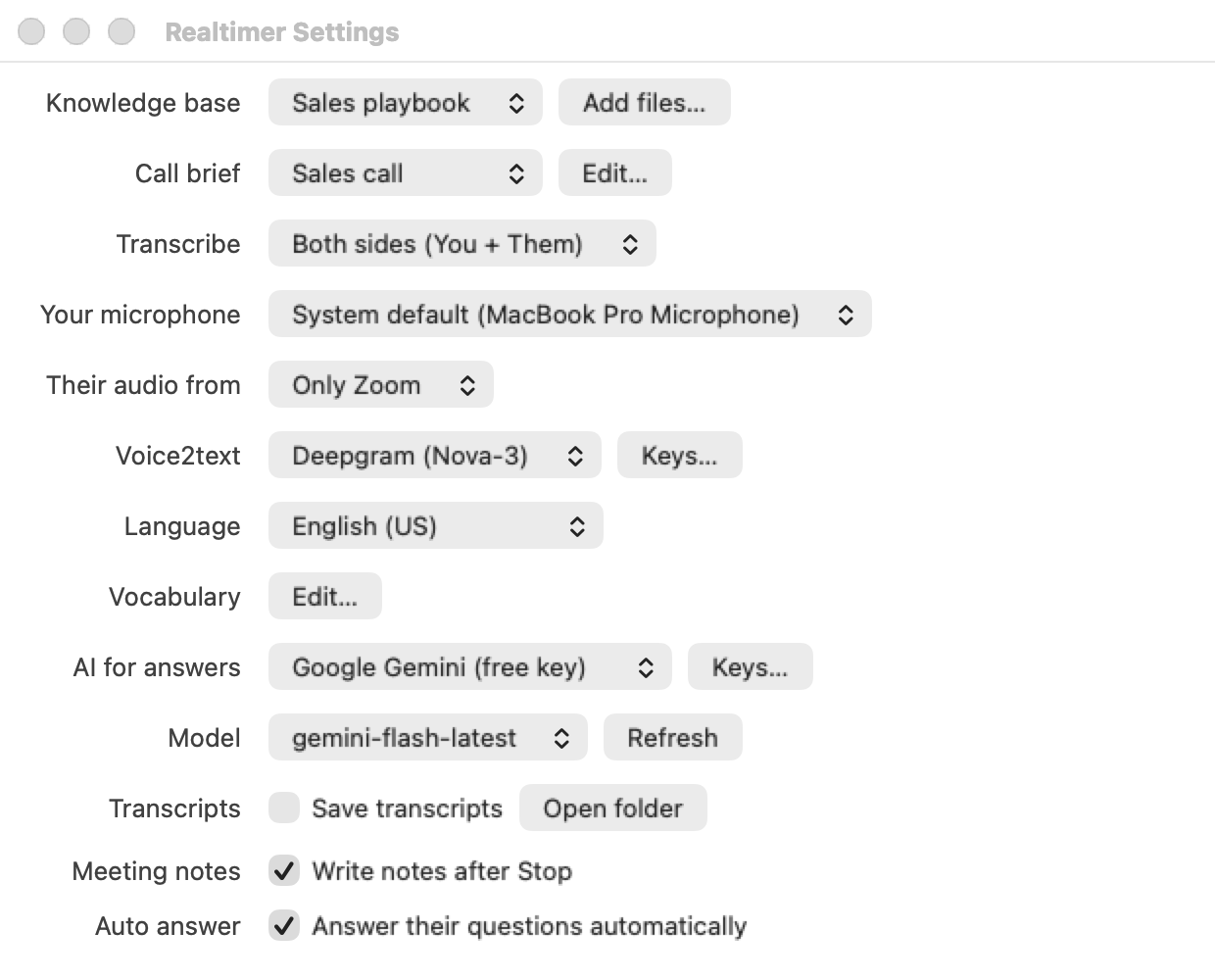
Every switch you need for real calls
Audio
- Both sides or only the other side
- Pick your microphone
- Pick the app to listen to: Zoom, Meet, Teams, WhatsApp…
Recognition
- Deepgram Nova-3 in 9 languages + multilingual
- Your vocabulary and “wrong → right” corrections
- Up to 10 keys, instant switching
Answers
- Gemini, OpenRouter, Groq, OpenAI or Claude
- Fast and AI buttons, from your files when you add them
- Auto answer to their questions
Your knowledge
- Knowledge base with unlimited files
- Call briefs for sales and real estate
Privacy
- Optional transcripts and meeting notes
- Hidden from screen sharing
Ready in about 3 minutes
Sign up and install
Create your account with your email, download Realtimer from it and drag it to Applications.
Add your two keys
Settings → Voice2text for Deepgram, Settings → AI for answers for Gemini, OpenRouter, Groq, OpenAI or Claude. Your account shows where to get them.
Press ▶ on your next call
Fast ⌃⌘↵ gives a short answer in about a second, AI ⌥⌘↵ a fuller one. Add your files and answers come from them.
Step by step: Getting started with Free
What Pro adds
Free is the whole app on your own keys. Pro includes AI and transcription, so there are no keys to manage, and adds call history, screenshots and the Claude connector.
| Feature | Free | Pro |
|---|---|---|
| Price | €0, no time limit | €29 a month |
| AI and transcription | Your own keys | Included, no keys to set up |
| Calls | Unlimited with your own keys | 25 hours a month included |
| Languages | 9 + multilingual mode | 60+ |
| Knowledge bases | 1, unlimited files | Unlimited |
| Call briefs | 5 built-in + 1 custom | Unlimited |
| Screenshots per answer | — | Up to 2 |
| Call history with search | — | ✓ |
| Claude connector | — | ✓ |
| No bot, hidden from screen sharing | ✓ | ✓ |
Realtimer Free: FAQ
Is Realtimer Free really free?
Yes. The app costs €0 and has no time limit. It runs on your own keys for transcription and answers, so any cost depends on the services you pick.
Which keys do I need?
Two: a Deepgram key for transcription (Settings → Voice2text) and a key for answers from Gemini, OpenRouter, Groq, OpenAI or Claude (Settings → AI for answers). Your account has step-by-step instructions for getting them. You can add up to 10 keys per service and switch between them at once.
What stays on my Mac?
Your files, the knowledge base, your keys, transcripts and notes. Audio is never stored. For an answer, only the recent lines of the conversation, your call brief and the few pieces of your files that fit the question go to the AI service whose key you added, never whole files.
Does a bot join the call?
No. Realtimer listens on your computer to your microphone and the call audio, and its window is hidden from screen sharing and recordings.
Can I try Pro later?
Yes. Start the 7-day Pro trial from your account: no card, up to 3 hours of calls. Afterwards you’re back on Free unless you subscribe for €29 a month.
Take your next call with Realtimer
Start Free on your own keys, or try Pro with AI and transcription included, free for 7 days.
No card · Mac and Windows