How to Write Meeting Minutes: Steps, Template and Example (2026)

To write meeting minutes, record the facts of the meeting (date, time, place, who attended), then each decision, motion and vote, and each action item with an owner and a deadline. Leave out the discussion. The official Robert’s Rules FAQ puts it in one line: “Minutes are a record of what was done at a meeting, not a record of what was said.” Write them within a day, send them to attendees, and have them approved at the next meeting.
What meeting minutes are for
Minutes are the official record of a meeting. A board, committee or association uses them to prove what was decided; a team uses them so everyone leaves with the same list of who does what. Six months later, when nobody remembers whether the budget was approved at €40,000 or €45,000, the minutes still say.
There are two common styles:
| Style | What it records | Used by |
|---|---|---|
| Formal minutes | Motions with their exact wording, who moved them, vote results, approvals | Boards, committees, nonprofits, associations, councils |
| Action minutes | Decisions and action items with owners and deadlines, a line of context where needed | Project teams, client meetings, internal meetings |
Formal minutes follow parliamentary procedure, usually Robert’s Rules of Order. Action minutes are what most companies mean by “meeting notes.”
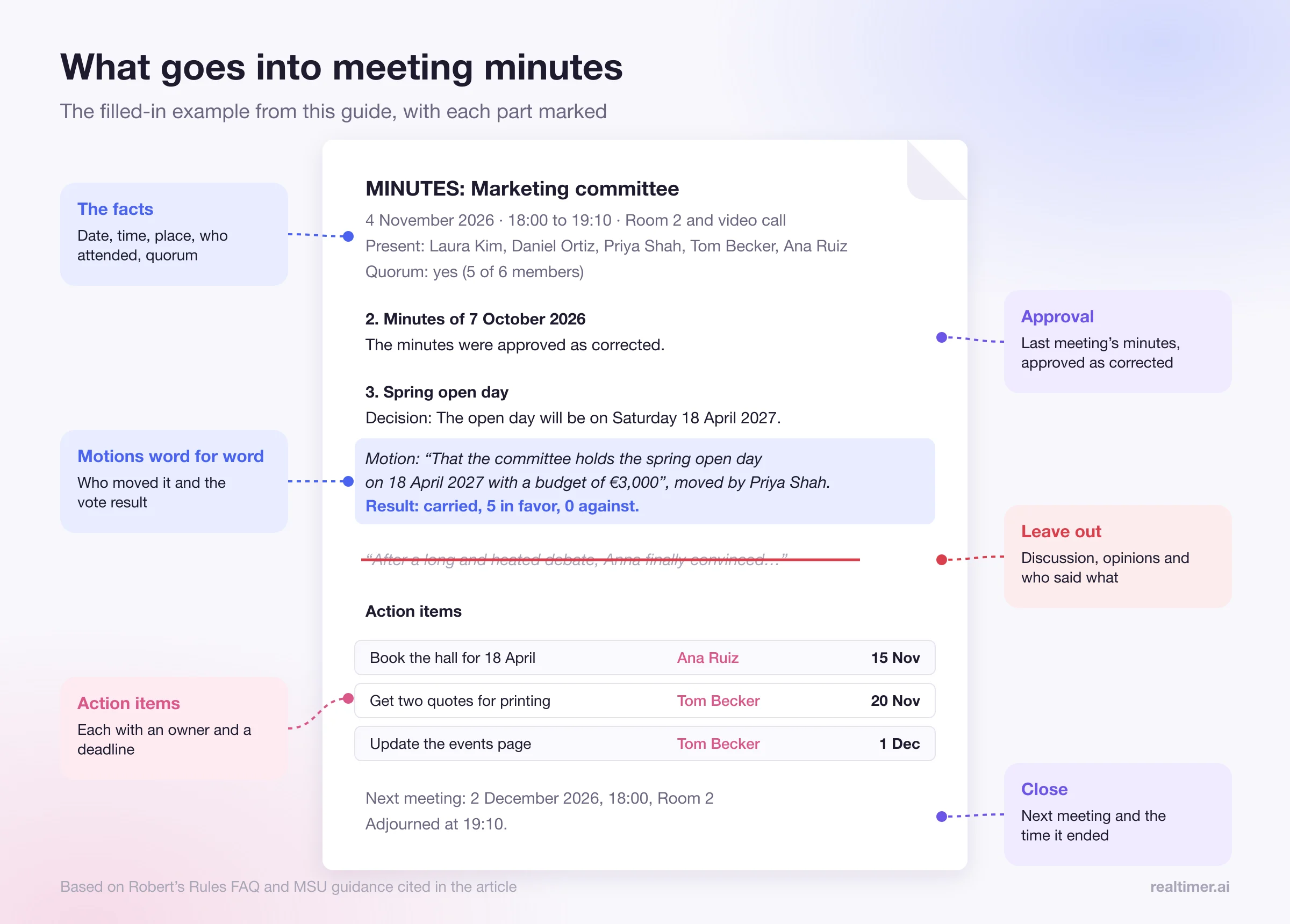
What to include in meeting minutes
Michigan State University’s guidance for its governance bodies, based on Robert’s Rules of Order Newly Revised (12th edition), lists what formal minutes should record:
- the date, time and location of the meeting;
- the name of the person presiding;
- approval of the agenda and of the previous minutes;
- every main motion and what happened to it;
- the names of the people who made motions (seconders are optional);
- points of order and appeals;
- vote results, without names unless a roll call was asked for;
- the time of adjournment.
Add, for any kind of meeting:
- who attended and who sent apologies;
- whether there was a quorum, if your rules require one;
- each decision in one sentence;
- each action item: what, who, by when;
- the date of the next meeting;
- who wrote the minutes.
What to leave out
The same MSU guidance says to leave out detailed discussion, personal opinions, withdrawn motions, and full reports, which can be attached instead. Write in neutral language and keep your own opinions out.
Some examples:
| Don’t write | Write |
|---|---|
| “After a long and heated debate, Anna finally convinced the board…” | “The motion carried, 6 in favor, 2 against.” |
| “Tom felt the vendor was too expensive.” | “The board asked Tom to get two more quotes by 15 November.” |
| “Everyone agreed it was a great quarter.” | “The Q3 report was received and is attached.” |
How to write meeting minutes, step by step
Before the meeting
- Get the agenda and build your draft around it, one heading per agenda item.
- Prepare the attendee list so you only tick names during the meeting.
- Ask how decisions will be made (formal votes, consensus, or the chair decides), because it changes what you write.
- Decide how you’ll capture it: a laptop with the template open, or a recording plus notes. If you record or transcribe, tell everyone and get their agreement first; MSU’s guidance asks for consent and an explanation of why you’re recording.
During the meeting
- Note the start time and who is there, including people who join late.
- For each agenda item, write one or two lines of context and then the outcome. Skip the back and forth.
- Write motions word for word. MSU’s guidance says to record the exact wording of a motion that’s adopted or rejected and not to paraphrase it. If a motion is long, ask the person to repeat it or hand it to you in writing.
- Capture action items the moment they’re agreed: the task, one owner (a name, not “the team”), and a date.
- Ask when something is unclear. “Can I note that as decided?” takes five seconds and saves a correction later.
- Note the end time.
After the meeting
- Write the clean version the same day, while you still remember what your shorthand means.
- Use past tense and neutral wording: “The committee approved,” “Maria reported.”
- Check names, numbers and dates against the agenda, the slides and the attachments.
- Send the draft to the chair to review, then to attendees, marked “Draft.”
- Get them approved at the next meeting. If changes are made when the minutes are first presented, the Robert’s Rules FAQ says the corrections go into the text, and the new minutes simply record that the previous minutes were approved “as corrected.”
- Store the approved version where people can find it, with attachments.
Meeting minutes template
Copy this and fill in the brackets:
MINUTES: [Name of group or meeting]
Date: [date]   Time: [start] to [end]   Place: [room or video link]
Presiding: [name]   Minutes taken by: [name]

Present: [names]
Apologies: [names]
Also attending: [guests, staff]
Quorum: [yes / no / not required]

1. Approval of the agenda
   The agenda was approved [as presented / with these changes: …].

2. Minutes of the previous meeting ([date])
   The minutes were approved [as presented / as corrected].

3. [Agenda item]
   Summary: [one or two lines of context]
   Decision: [what was decided]
   Motion (if any): "[exact wording]", moved by [name]. Result: [carried / failed], [votes for / against / abstaining].

4. [Agenda item]
   ...

Action items
- [Task] | Owner: [name] | Due: [date]
- [Task] | Owner: [name] | Due: [date]

Next meeting: [date, time, place]
Adjourned at [time].

Approved on: [date]   Signed: [secretary / chair]
Meeting minutes example
MINUTES: Marketing committee, Riverside Community Center
Date: 4 November 2026   Time: 18:00 to 19:10   Place: Room 2 and video call
Presiding: Laura Kim   Minutes taken by: Daniel Ortiz

Present: Laura Kim, Daniel Ortiz, Priya Shah, Tom Becker, Ana Ruiz
Apologies: Mark Ellis
Quorum: yes (5 of 6 members)

1. Approval of the agenda
   The agenda was approved as presented.

2. Minutes of 7 October 2026
   The minutes were approved as corrected.

3. Spring open day
   Summary: Priya presented two dates; the hall is free on both.
   Decision: The open day will be on Saturday 18 April 2027.
   Motion: "That the committee holds the spring open day on 18 April 2027 with a budget of €3,000",
   moved by Priya Shah. Result: carried, 5 in favor, 0 against.

4. Website update
   Summary: Tom reported that the events page is out of date.
   Decision: Tom will update it monthly from now on.

Action items
- Book the hall for 18 April | Owner: Ana Ruiz | Due: 15 November
- Get two quotes for printing | Owner: Tom Becker | Due: 20 November
- Update the events page | Owner: Tom Becker | Due: 1 December, then monthly

Next meeting: 2 December 2026, 18:00, Room 2
Adjourned at 19:10.
Tips that make minutes easier
- Sit next to the chair, so you can ask for a motion to be repeated without interrupting the room.
- Number the action items and start the next meeting by going through them.
- Use the same template every time, so readers know where to look.
- Use initials for names during the meeting and expand them later.
- If you chair the meeting, ask someone else to write the minutes.
- Attach long reports instead of copying them in. A ten-page report becomes “The treasurer’s report was received (attached).”
Using AI to write meeting minutes
AI note tools can do the slowest part: turning an hour of talk into a summary with decisions and action items. Zoom, Google Meet and Microsoft Teams each offer an AI summary on some of their paid plans, and standalone notetakers work across platforms. For Zoom’s own options, see how to transcribe a Zoom meeting.
AI handles the full transcript, a first draft of decisions and action items, and who said what. A person still has to check:
- The exact wording of motions. A summary paraphrases, and formal minutes need the exact text.
- What was actually decided. AI can read a suggestion as a decision, so check every “decided” line.
- Owners and dates. “Someone should look at that” becomes an action item only when a person and a date are attached.
- Cutting. A transcript has everything that was said; delete what doesn’t record an action or decision.
- Consent. Tell attendees the meeting is transcribed, and get agreement where your rules or law require it.
Realtimer, which we make, writes notes after each call on your Mac: a summary, key points, decisions and next steps, shaped by your call brief, with no bot joining the meeting. It’s built for sales, property and recruiting calls; for formal board minutes, use its notes as a first draft and keep the motions word for word. See meeting notes.
FAQ
What should meeting minutes include?
The date, time and place; who attended; each decision, motion and vote result; action items with an owner and a deadline; the date of the next meeting; and the time the meeting ended.
Should meeting minutes record the discussion?
Mostly no. Robert’s Rules says minutes record what was done, not what was said. Add a line of context where a decision would otherwise be unclear.
How soon should minutes be sent out?
Write them the same day or the next, while your notes still make sense, and send the draft after the chair has checked it.
Who approves meeting minutes?
The group itself, usually at its next meeting. Corrections made then go into the text, and the new minutes record that the previous ones were approved "as corrected."
Do I need to write down who seconded a motion?
MSU’s guidance, based on Robert’s Rules, says the names of people who make motions are recorded and seconders are optional.
Can AI write meeting minutes?
AI notetakers can write a good first draft from a transcript. A person still needs to check decisions, owners, dates and the exact wording of motions before the minutes are approved.
What’s the difference between minutes and meeting notes?
Minutes are the official, approved record of decisions. Meeting notes are informal and personal, and can include anything the writer found useful.
Sources: Robert's Rules of Order: FAQ; Michigan State University: Writing minutes; City of Madison: Taking committee minutes.