Granola Review and Pricing (2026): What the AI Notetaker Does, Costs and Leaves Out
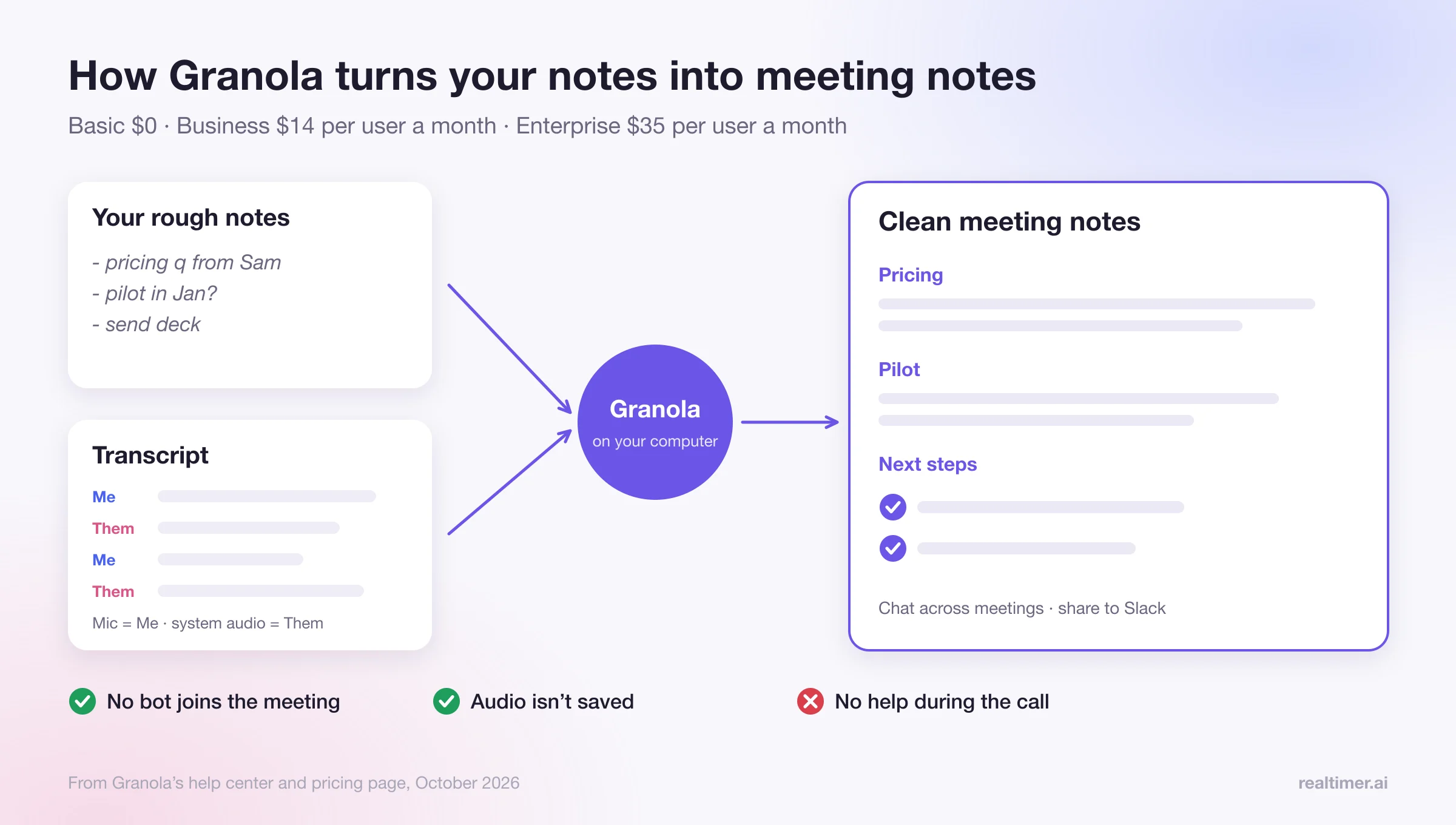
Granola is an AI notetaker that runs on your own computer instead of joining the meeting as a bot. It listens to your microphone and system audio, transcribes the call, and turns your own rough notes plus the transcript into clean meeting notes afterwards. The free Basic plan keeps 30 days of history; Business costs $14 per user a month and Enterprise $35. It’s one of the simplest ways to get good notes without a bot in the participant list. It doesn’t help you during the call, and its default sharing settings are worth checking on day one.
Checked in October 2026 against Granola’s pricing page, its help center and the news coverage linked in the sources. Granola changes quickly, so check the current version before you buy. We make Realtimer, which also runs without a bot; we compare the two honestly at the end.
What Granola is
Granola describes itself plainly in its help center: “There is no meeting bot — Granola runs only on your computer and uses your system audio and microphone.” You open a note when the meeting starts (or click the notification Granola shows), type whatever you’d normally jot down, and after the call Granola merges your jottings with the transcript into structured notes.
The company is well funded. In March 2026 it raised $125 million in a Series C led by Index Ventures at a $1.5 billion valuation, according to Bloomberg, and launched team workspaces (Spaces) and enterprise APIs around the same time.
How Granola works
| Question | Answer from Granola’s docs |
|---|---|
| Does a bot join the meeting? | No. It runs on your computer and uses system audio and your microphone |
| Which apps does it work with? | Any app whose sound plays on your computer; it can’t isolate one app, so other audio playing may be transcribed too |
| Who said what? | Your microphone is labeled “Me” and system audio “Them”; on Google Meet, Zoom and Teams it uses participants’ display names |
| When does it start and stop? | When you open a note or click the notification; it stops when you stop it or when it detects the call has ended |
| Is audio saved? | No. Audio goes to its transcription provider and isn’t saved; Granola says it doesn’t record or save audio or video |
| Platforms | Desktop apps for macOS and Windows, mobile apps for iPhone and Android; the web app is for viewing and editing only |
| Languages | Granola announced support for 32 languages on desktop with a multi-language mode for mixed meetings; the app interface is English only |
Because Granola hears everything your computer plays, a YouTube video in another tab ends up in the transcript. And because nothing joins the call, nobody else knows Granola is running unless you tell them, which matters for consent (more below).
Granola pricing
From Granola’s pricing page, checked in October 2026:
| Plan | Price | What you get |
|---|---|---|
| Basic | $0 | AI meeting notes; 30 days of meeting history; AI chat within and across meetings; Slack integration; per-user opt-out from model training; SOC 2 Type II |
| Business | $14 per user a month | Unlimited notes and history; more advanced AI models and model choice in chat; pre-meeting briefs; follow-up emails; integrations with Attio, Notion, HubSpot, Affinity and Zapier; API and MCP access; central billing and user management |
| Enterprise | $35 per user a month | Everything in Business, plus Salesforce and other advanced integrations; SSO and SCIM; HIPAA-compliant workspaces; audit API; organization-wide auto-deletion; workspace-wide model training opt-out; usage analytics; priority support |
The pricing page lists monthly per-user prices and no separate free trial; the free plan is the trial.
On the free plan, notes older than 30 days drop out of view, so it’s fine for trying Granola for a few weeks but not for keeping a record. Most people who use it daily end up on Business.
What Granola costs for a team
| Team size | Business | Enterprise |
|---|---|---|
| 1 person | $14 a month | $35 a month |
| 5 people | $70 a month | $175 a month |
| 20 people | $280 a month | $700 a month |
These are list prices times seats; ask Granola about annual billing or volume pricing for larger teams.
What Granola does well
Notes that read like yours
Because it starts from what you typed, the final notes follow your priorities rather than a generic summary of everything said.
No bot in the meeting
On a first call with a client or a candidate, nobody has to ask who “Notetaker” is.
Works with any meeting app
Zoom, Meet, Teams, Slack huddles, a phone call through your computer: if the sound plays on the computer, Granola can transcribe it.
Chat across meetings
You can ask questions about a meeting, or across meetings (“what did the client say about the budget last month?”), even on the free plan.
Little to set up
There’s no calendar bot to configure and no admin approval for a recorder in every meeting.
Where Granola falls short
No help during the call
Granola transcribes as you talk, but its output is notes. If a client asks a question you can’t answer, Granola won’t show you the answer.
Default sharing settings
In April 2026 several outlets reported that Granola’s settings said “By default, your notes are viewable to anyone with the link,” and that notes could be used for internal AI training unless you opt out. Granola’s help center says it doesn’t share notes automatically and that a note is shared only when someone creates a link or adds it to a shared folder; shared links show summaries, not transcripts. Either way, check two settings when you install it: the default link sharing (Settings, Preferences, Data and sharing: “Anyone with the link,” “Only for my company” or “Private”) and the model training opt-out. The help center notes that changing the link default doesn’t apply to notes you already shared.
It captures all computer audio
That helps with unusual call apps, but a notification sound or a video playing in another tab can end up in the transcript.
Some extras are English only
The custom jargon box, which improves recognition of names and terms, works only for English.
No team analytics
There are no call scorecards, talk ratios or coaching dashboards like Gong’s or Avoma’s. It’s built for the person taking notes; a manager who reviews a team’s calls needs another tool.
Granola and consent
A tool without a bot still transcribes the conversation, so recording and transcription rules still apply. About a dozen US states, including California, Florida and Illinois, require everyone on a call to agree to recording, and in the EU and UK data protection law requires a lawful basis and notice. Granola doesn’t announce itself to other participants. A sentence at the start of the call (“I’m using an app to take notes, is that OK?”) covers most situations.
Who Granola is for
Granola is a good fit if you have many meetings a day, take your own notes anyway, and want them cleaner without a bot. Founders, investors, consultants and managers are the obvious users; Affinity and Attio integrations on Business point to investors and dealmakers.
It’s a weaker fit if you need answers during the call, call analytics for a team, or a recording of the audio itself (Granola doesn’t keep audio).
Granola alternatives
| Tool | How it records | Best for |
|---|---|---|
| Granola | On your computer, no bot | Your own meeting notes |
| Realtimer | On your Mac, no bot | Answers during sales, property and recruiting calls, plus notes |
| Avoma | Bot by default; Zoom cloud recording for meetings you host | Team notes, coaching and scorecards |
| Fathom, Otter, Fireflies | Bot by default; each now has a desktop mode without one | Free or cheap notes with recordings |
| Your meeting app’s AI | Built into Zoom, Meet or Teams on some paid plans | Summaries without another tool |
We compared bot-free options in more detail in Avoma alternatives without a bot and Tactiq alternatives, and Zoom’s built-in options in how to transcribe a Zoom meeting.
Granola vs Realtimer
Both run on your computer and nothing joins the meeting. The difference is when they help. Granola writes notes after the call. Realtimer, a Mac app we make, is built for the moment during the call: when a client asks about a price, a unit or a competitor, you press a key and see the answer from your own price list and documents in about a second, with the source, and you also get notes after the call. Realtimer is Mac only and costs €29 a month on Pro (7-day trial), or nothing with your own API keys; Granola runs on Mac, Windows and phones and starts free. If notes are all you need, Granola is the simpler choice. If you sell, show property or recruit on calls, see the sales assistant page.
Other tools that don’t join as a bot: AI meeting assistants without a bot.
FAQ
Is Granola free?
Yes, the Basic plan is free, with AI notes and 30 days of meeting history. Business costs $14 per user a month and Enterprise $35.
Does Granola join meetings as a bot?
No. Granola runs on your computer and uses your microphone and system audio, so nothing appears in the participant list.
Does Granola record audio?
Granola says it doesn’t record or save audio or video. Audio is sent to its transcription provider for the transcript and isn’t kept.
Does Granola work on Windows and phones?
Yes. There are desktop apps for macOS and Windows and mobile apps for iPhone and Android. The web app is for viewing and editing notes.
Is Granola private?
It’s SOC 2 Type II and doesn’t keep audio. Check two settings after installing: default link sharing (set it to "Private" or "Only for my company" if you prefer) and the model training opt-out.
Does Granola work during the call?
It transcribes during the call, but its job is notes afterwards. It doesn’t show answers or prompts while you talk.
What’s the best Granola alternative for sales calls?
If you need help while the buyer is still talking, look at a real-time assistant. Realtimer runs on your Mac without a bot and answers from your own documents during the call.
Sources: granola.ai/pricing; Granola help: transcription; Granola help: sharing controls; Granola: 32 languages; Bloomberg: Granola $1.5B valuation; Hashe: Granola default link sharing; Reline: bot-free notetakers; avoma.com/pricing.