What Is Read AI? How the Meeting Notetaker Works, What It Costs, and How to Remove It

Read AI is an AI meeting assistant that joins Zoom, Microsoft Teams and Google Meet calls, takes notes, writes a meeting report and scores how the meeting went. It also searches across your meetings, email and messages. The free plan covers 5 meetings a month of up to an hour; Pro costs $19.75 per user a month, or $15 on annual billing. Many people first meet Read AI when its assistant shows up in a meeting they didn’t invite it to, which is why “how to remove Read AI” is one of the most searched questions about it.
Checked in October 2026 against Read AI’s pricing page and the help and news sources linked below. We make Realtimer, a different kind of meeting tool; it’s mentioned once below.
What Read AI does
Read AI was founded in Seattle by David Shim, Rob Williams and Elliott Waldron. In October 2024 it raised a $50 million Series B led by Smash Capital, which Reuters reported valued the company at $450 million. It describes its product as a copilot across meetings, email and messaging, with integrations for Teams, Meet, Zoom, Slack, HubSpot and Salesforce.
In meetings it does four things:
| Feature | What it does |
|---|---|
| Notes and transcript | Live notes, a transcript and a meeting report after the call |
| Meeting Coach | Scores meetings and gives feedback on how they went; included on every plan |
| Ask Read and Search Copilot | Answers questions across your meetings and connected apps; Search Copilot with access to models like Claude and GPT is on paid plans |
| Integrations | Sends notes to tools such as Slack, HubSpot and Salesforce; premium integrations on paid plans |
How Read AI joins your meetings
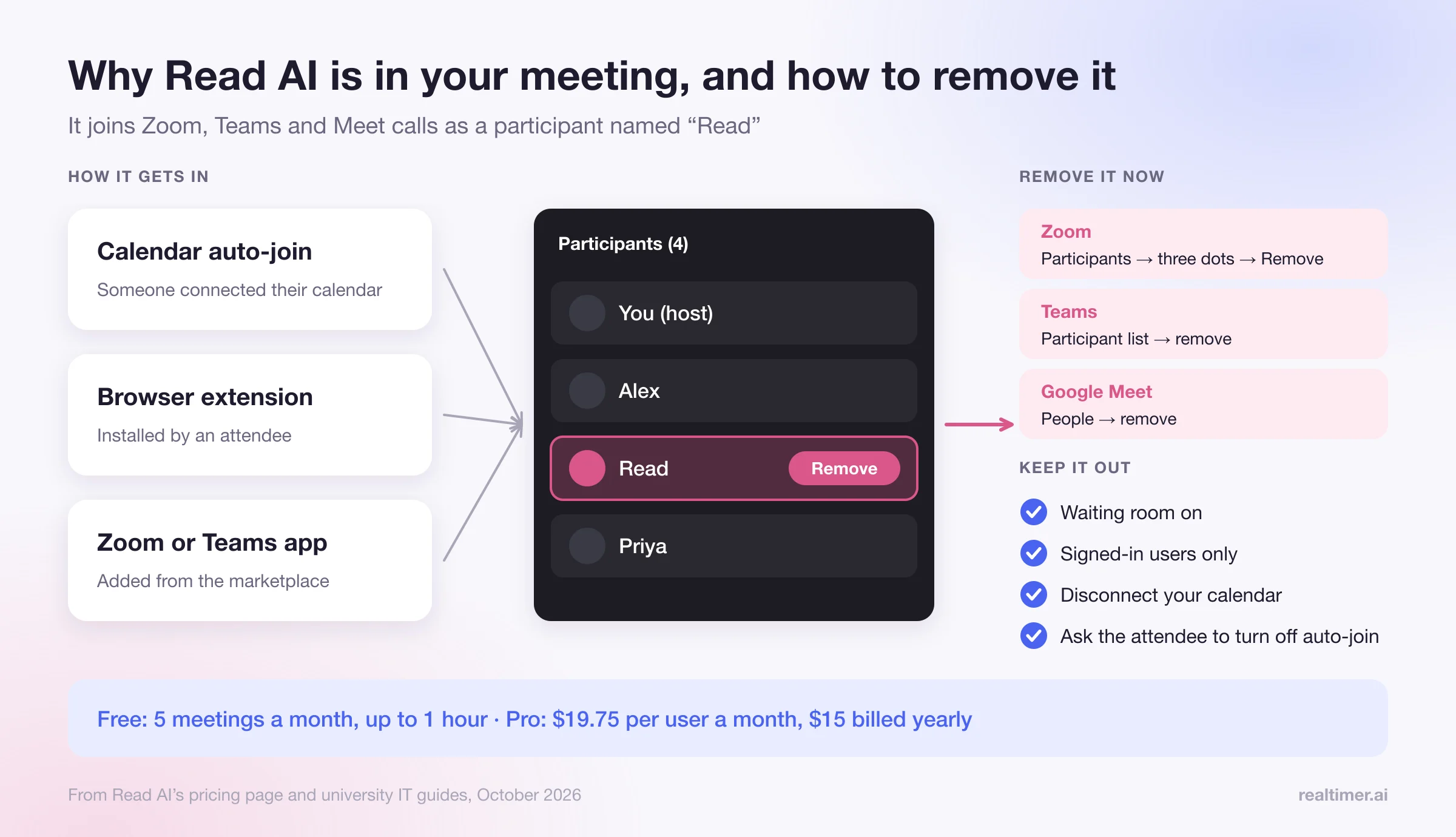
Read AI’s pricing page says the Read Assistant joins your video call on Zoom, Teams and Meet to take notes. In practice it appears as a participant, usually named “Read,” and paid plans can brand it. Read also has desktop apps for Windows and macOS that record and transcribe on your computer without joining the call.
The same setup explains why it turns up uninvited. University IT guides and community threads describe the usual causes: someone in the meeting connected their calendar to Read AI and set it to join automatically, or installed a browser extension or a Zoom or Teams app. UC Davis IT notes it may appear in sensitive or private meetings. Once one person has it on auto-join, it can show up in any meeting on their calendar.
How to remove Read AI from a meeting
In a meeting you host:
- In Zoom, open Participants, find “Read,” click the three dots and choose Remove.
- In Teams, open the participant list, find “Read,” and remove it like any other attendee.
- In Google Meet, open People, find Read, and remove it.
To keep it from joining your meetings:
- turn on a waiting room and admit only people you expect;
- require participants to sign in (authenticated users only);
- if it joins from your own account, disconnect your calendar and your Zoom or Teams account in Read AI, and revoke its calendar access in your Google or Microsoft account;
- remove any Read AI browser extension and uninstall its app from the Zoom or Teams marketplace;
- in a company, ask IT to block or approve the app centrally.
If someone else brings it, removing it only works for that meeting; ask the person to change their Read AI auto-join settings.
Read AI pricing
From Read AI’s pricing page, per user:
| Plan | Monthly | Annual billing | Main limits |
|---|---|---|---|
| Free | $0 | $0 | 5 meetings a month for notes, transcripts and reports; meetings up to 1 hour; no audio or video playback; no uploads |
| Pro | $19.75 | $15 | Unlimited meetings up to 4 hours; premium integrations; 100 minutes a month of uploads; Search Copilot with LLM access |
| Enterprise | $29.75 | $22.50 | Everything in Pro plus audio and video playback, 200 minutes of uploads, dedicated support; 5 licenses minimum |
| Enterprise+ | $39.75 | $29.75 | Plus 300 minutes of uploads, 8-hour meetings, HIPAA compliance, SAML and SCIM, custom data retention; through sales |
Ask Read and Meeting Coach are on every plan. Custom branding of the assistant starts with Pro. Audio and video playback of your own meetings needs Enterprise.
Is Read AI safe to use?
Read AI’s Enterprise+ plan adds HIPAA compliance, SSO and custom data retention for companies that need them. The questions to ask are the same as for any notetaker:
- Who in the meeting agreed to it? A bot in the participant list is a notice of sorts, but several US states, including California, Florida and Illinois, require everyone’s consent to recording, and EU and UK data protection law requires a lawful basis and notice.
- Where do transcripts go, how long are they kept, and who can see the meeting reports? Check the default sharing of reports with attendees.
- Is it set to join every meeting on your calendar, including one-on-ones and HR conversations? Turn auto-join off for meetings that shouldn’t be recorded.
Read AI alternatives
| If you want | Look at |
|---|---|
| Notes without a bot in the meeting | Read’s own desktop app, Granola, or Tactiq for browser meetings |
| A recording plus notes, with a bot | MeetGeek, Fathom, Otter or Fireflies |
| Help during the call, not after | A real-time assistant that runs on your computer |
| Coaching and scorecards for a sales team | Gong, Avoma or Salesloft |
For bot-free options we compared Tactiq alternatives and reviewed Granola. If your calls are with clients and you need answers while they’re talking, Realtimer runs on your Mac without joining the meeting and shows answers from your own price list and documents in about a second; see the sales assistant page.
FAQ
What is Read AI?
An AI meeting assistant that joins Zoom, Teams and Google Meet calls to take notes, write a meeting report and score the meeting, and searches across meetings, email and messages.
Is Read AI free?
Yes, for 5 meetings a month of up to an hour each. Pro costs $19.75 per user a month, or $15 on annual billing.
Why is Read AI in my meeting?
Usually because someone in the meeting connected their calendar to Read AI with auto-join on, or installed its extension or app. It joins as a participant named Read.
How do I remove Read AI from Zoom?
As host, open Participants, find Read, click the three dots and choose Remove. To stop it coming back, use a waiting room, require sign-in, and disconnect Read AI from your calendar and Zoom account if it’s yours.
Does Read AI record without joining the call?
Yes, with its desktop apps for Windows and macOS, which record on your computer. In video meetings the Read Assistant otherwise joins as a participant.
Is Read AI the same as Otter or Fireflies?
They’re similar notetakers that usually join as a bot. Read AI adds meeting scores (Meeting Coach) and search across email and messages.
Sources: read.ai/pricing; Read AI: $50M Series B; GeekWire: Read AI raises $50M; The Star (Reuters): Read AI at $450M valuation; UC Davis IT: Read AI; Cornell IT: managing AI notetakers; Zoom Community: stop Read AI joining.